Concepts
Overview
The Dynamic Templating AccPack provides layout conditions and rules for creating priint:comet templates to be used in the Grid Planning view of priint:planner. The conditions and rules run during the generation of the Grid Element Preview and in the final build to adjust template frames to fit the actual planned area on a spread.
Grid Planning and RealGridElements
In priint:planner, the Grid Planning divides each spread into a fixed grid based on the assigned page template. Each cell in that grid is called a RealGridElement. A consultant assigns a product to a RealGridElement in the Content Assignment stage.
Users of the priint:planner can merge adjacent RealGridElements to create a larger area for a single product. They can also manually resize a grid element by dragging its edges. The result is a RealGridElement whose dimensions differ from the original grid cell defined in the page template.
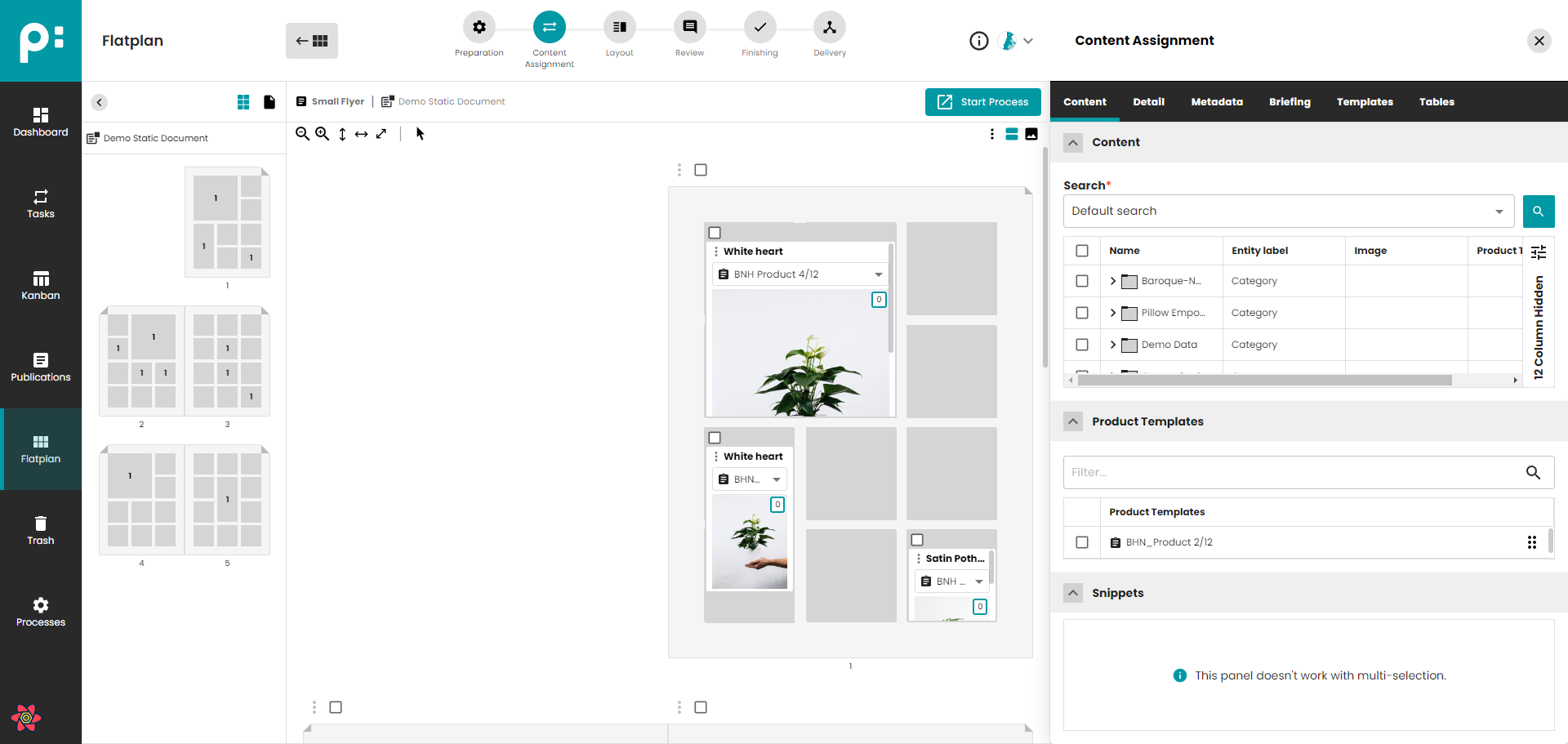
To find out more information about the Grid Planning in the priint:planner check this documentation.
The challenge: Templates are usually designed for a fixed grid. If your Grid is a 3x4 you don't want to end up with 12 Templates. Ideally you only build one, and the template will adapt dynamically.
When resizing a RealGridElement, the actual area is larger or smaller than the template. Without adjustment, frames are placed at their original positions and sizes and do not fill the planned area, or worse contents of the template will overlap.
The Dynamic Templating AccPack gives you the tools to solve this. It provides conditions that detect how the planned area differs from the page template definition, and rules that reposition and resize frames to match the actual area.
How it works
Each layout condition checks the current state of the RealGridElement during the buildup. The condition compares the coordinates of the planned RealGridElement against the corresponding element in the page template. If the condition is true, the layout rules attached to it are executed. If it is false, the rules are skipped.
Based on which rules and conditions are assigned dynamic templates that react to the size of the RealGridElement can be built.
The AccPack contains two groups of conditions and rules.
Grid-aware conditions and rules
These work with the RealGridElement coordinates stored in the planning record. During the build script, the condition or rule reads the actual coordinates of the planned area and compares or uses them to adjust individual frames.
Conditions:
- [dynTemp] Grid dimensions changed: true when the RealGridElement width or height differs from the page template element, within a configurable tolerance.
- [dynTemp] Grid dimensions are in range: true when the RealGridElement width or height falls within a defined range in millimetres.
Rules:
- [dynTemp] Arrange frame to realgrid edge: moves the current frame to a selected edge of the RealGridElement (left, top, right, or bottom) with an optional margin.
- [dynTemp] Place subtemplate at grid corner: places a second template (by ID) at a specified corner of the RealGridElement with optional X and Y margins. The placed template is added to the comet group and brought to front.
- [dynTemp] Place subtemplate next to frame: places a second template at a specified corner of the current frame rather than the grid corner, with optional X and Y margins.
- [dynTemp] Enlarge proportionally to next frame: resizes the current frame proportionally toward the next frame of the same comet group, using a selected anchor point and optional X and Y margins.
- [dynTemp] Enlarge frame to next frame: resizes the current frame in one direction (left, right, top, or bottom) up to the nearest frame of the same comet group, with an optional margin. If no adjacent frame exists, the rule uses the RealGridElement edge as the boundary.
- [dynTemp] Move frame down to next frame: moves the current frame downward to the nearest frame of the same comet group, if space exists. If no frame is found below, the rule uses the RealGridElement bottom edge as the reference.
- [dynTemp] FitFrame max to realgrid: performs a fit-frame operation (auto-resize to content) and then caps the result at the RealGridElement border. An anchor point controls which corner stays fixed. An option prevents width changes when only the height needs to grow.
Multiframe and repeating element rules
These work with multiframes that contain repeating elements. Because a multiframe may only load all its repeating elements when it is large enough, the functions in this group temporarily expand the multiframe to the full page size, build the repeating elements, collect the result, and then return the multiframe to its original area before applying the adjustment.
Condition:
- [dynTemp] Has X repeating elements: true when the number of repeating elements built by the multiframe equals the entered value. The multiframe is temporarily expanded to page size to ensure all elements are loaded before counting.
Rules:
- [dynTemp] Nested area build: positions the repeating elements of the multiframe in a nested arrangement. Elements are placed at calculated offsets from a selected anchor corner (top-left, top-right, bottom-left, or bottom-right). The z-order of each element is adjusted to create the nested view.
- [dynTemp] Enlarge first repeating element: resizes the first repeating element of the multiframe to fill the entire multiframe area. The element must have exactly one frame. After resizing, the image is fit to the new frame size.
Shared library
All conditions and rules delegate their logic to lib_dynamictemplating. This shared script library contains the functions that read RealGridElement coordinates, compare them to page template element coordinates, and perform the actual frame operations. The individual condition and rule scripts handle parameter conversion and call the corresponding library function.
The library is deployed as a shared include file on the Publishing Server and must be present for any condition or rule in this AccPack to execute.
Next steps
- Installation and Configuration: how to install the AccPack and the optional demo templates.
- Reference: parameters and behavior of each layout condition and layout rule.