Template Selection
Inactive Tabs
A distinction is made between displaying the tabs of all chapters or only the tab belonging to the relevant chapter.
If all tabs should be displayed, the tabs for the active chapter as well as all other chapters are shown. For this reason, different templates for the active index tab and for the inactive index tabs can be defined in the metadata.
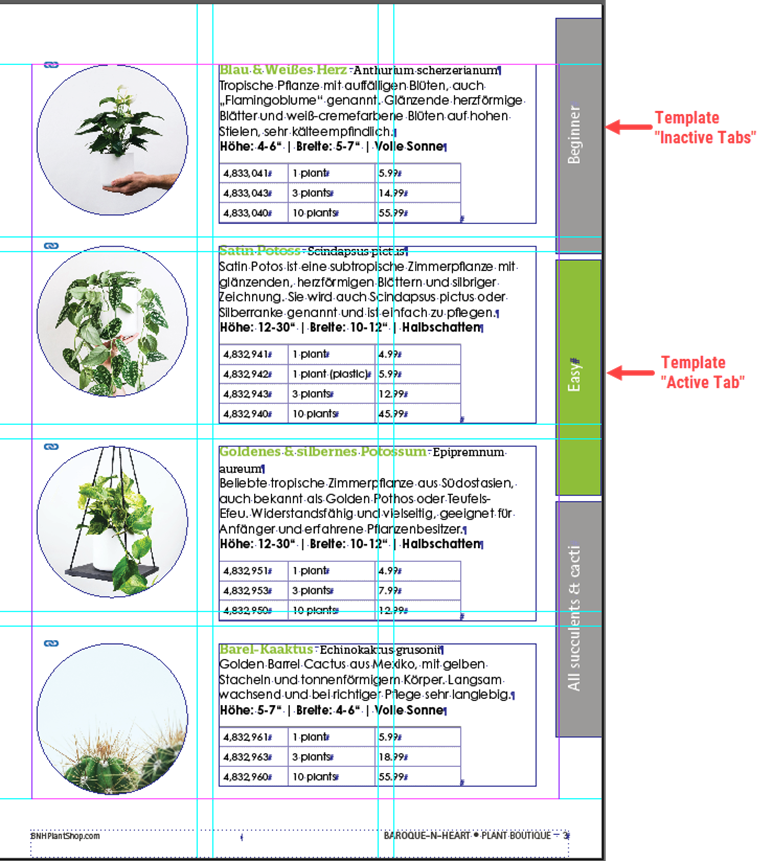
How It Works
Each template used for index tabs must contain exactly one frame. Multi-frame templates are not supported.
The template frame must carry the Comet frame tag key accpack_index_tab. The build script uses this tag to identify and manage all tab elements throughout their lifecycle: it removes existing tabs by this tag before each run and places new ones in the "Index Tabs" layer.
Templates are registered in priint:admin under the value list itab_template_ids. Each entry requires two values: Value 1 is the label shown in the dropdown, Value 2 is the template ID used by the script when placing the template.
Frame rotation of 90° is supported. The script accounts for rotation when sizing the frame.
Metadata
| Name | Identifier | Description |
|---|---|---|
| Show All Tabs | itab_showall_tabs (checkbox) | yes = inactive tabs are shown, too |
Template names and IDs must be added to the value list "itab_template_ids" within priint:admin. The predefined values are only examples; the templates are not part of the Acceleration Package!
| Name | Identifier | Description |
LEFT PAGE | Template Left Page | itab_template_left (drop down) | Template that should be used for the active index tab for a left-handed page. |
Template Left Page Inactive | itab_template_inactive_left (drop down) | Template that should be used for the inactive index tab for a left-handed page. | |
RIGHT PAGE | Template Right Page | itab_template_right (drop down) | Template that should be used for the active index tab for a right-handed page. |
Template Right Page Inactive | itab_template_inactive_right (drop down) | Template that should be used for the inactive index tab for a right-handed page. |