Concepts
Most tables in production projects are either very simple or very complex. The Table Placeholder covers the 80% of cases we have found across our projects.
Use the tables to quickly get started in a project showing your data in the templates, after checking all supported features you might be surprised how far you can come.
A simple example is provided that queries the child buckets of a planned product. For a deeper look at all available options, see the reference.
Once the general concepts are clear, you can start configuring for your project's use case.
Table Structure
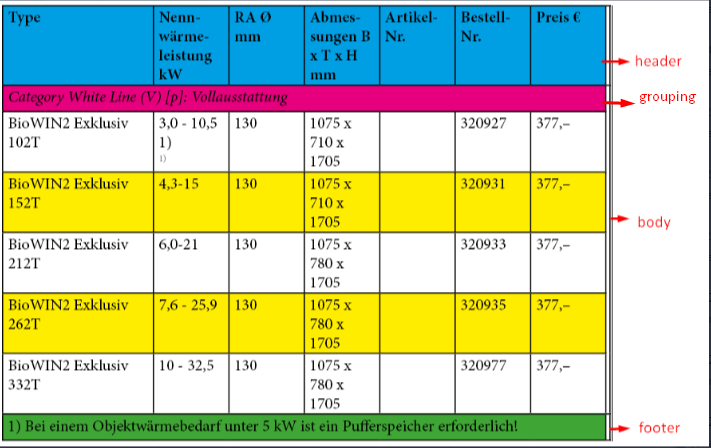
A table is built from four row types. Each type has its own formatting configuration.
- Header rows: one row at the top, driven by the
<header>column configuration. Can be disabled. - Grouping rows: optional. Groups body rows by a shared key value. Supports key value data only.
- Body rows: one row per child bucket. Each body cell can carry multiple values.
- Footer rows: optional. Same structure as body columns.
Body row formatting can override header, grouping, and footer formats when needed.
Displays key values and media assets for child buckets as rows. Each row is a child bucket or planned bucket that links to a sub-planning record.
- header rows
- grouping rows: optional, supports key value data only
- body rows: supports multiple values
- header cell: optional
- body cell
- footer rows
- formatting
- header
- body: can override header, grouping, and footer formatting
- grouping rows: optional
- footer rows: optional
- supports a placeholder inside the cell: Placeholder Inside Table Data Cell
- supports a sub-template inside the cell
- supports cell value transform by static transform or Publishing Server plugin method (the plugin method accepts one parameter: an Object cast to a KeyValue entity)
Child Bucket Modes
The tableConfiguration element controls which records become rows. There are two modes.
Bucket mode works from the content tree. The placeholder evaluates the bucket identifier and retrieves the children buckets below it in the entity model tree. Row filters can narrow this set, so only buckets matching specific entity identifiers are included as rows.
Planning mode works from the planning tree. The placeholder evaluates the planning identifier and retrieves the sub-planning records below it. Sub-plannings are created in the priint:planner by selecting buckets within a planning. Those selections are converted into sub-plannings.
Combined with rowFilters, both modes let you include only the rows relevant to your table.
Cell Content
Each column cell is configured to show one of:
- Key value: a named value from a key-value entity, addressed by entity identifier and key. Cell values support XPath expressions. Prefix, suffix, and an optional character style can be applied.
- Media asset: a file path or URL from a media asset entity.
Cell-Level Extensions
Two mechanisms extend what a single cell can display beyond the standard key value or media asset:
- Placeholder inside table data cell: place an independent placeholder in a cell. Supported types are ChildBucket_KeyValueById, which resolves a key value by dynamic XPath, and ChildBucket_StaticContent, which loads a fixed text from
staticContent.xml. - Sub-template inside table cell: load an InDesign sub-template into a media asset cell using the
templateIdattribute on<mediaAsset>. SeemediaAsset.
Value Transformation
A key value cell can transform its value before it is written to the table:
- Static transform: maps the value to a fixed translation by identifier, using
staticContent.xmlwith context support. - Plugin method transform: calls a custom Publishing Server plugin method that receives the KeyValue entity as its input.
Row Filtering and Grouping
Body rows can be filtered by entity identifier using rowFilters, with and or or logic.
Rows can be grouped by one or more key values using groupColumns. Within each group, the sort order and sort direction are configurable. Rows that share identical cell values across all columns in a group can optionally be hidden with hideRowSameValue.
XML Configuration
Table behavior is driven by a childBucketTable.xml file in the plugin's configuration folder. Each table definition has a unique configId, which the placeholder references as its function variable. One file can hold multiple table configurations.
See Generic Child Bucket Table Placeholder for the full XML schema reference.