Demo Data Model
This page describes the entity model behind the demo data import. It contains only the entities and supporting objects required for the demo workflows, while keeping the structure of a real project.
An entity model is built from buckets, the tree nodes of the model, and content entities such as KeyValue, MediaAsset, or Price, which hold the actual content. For the full explanation, see What is an entity model.
Because many entities have dependencies, a missing bucket, entity, or attribute can cause errors. All required buckets, entities, and attributes must be available. The structure and descriptions are below.
The import file itself does not include data for every entity of this model. It is a starting point that you extend with your own data.
Entity structure
The demo data is organized around two bucket entities:
- Category: represents the catalog hierarchy.
- Product: represents individual catalog products and contains all product-specific information, including images, prices, technical documents, metadata, and custom attributes.
Category
The Category bucket is the root of the catalog. It holds its own image, attributes, and type information. A category contains the products that belong to it, and it can also contain further categories.
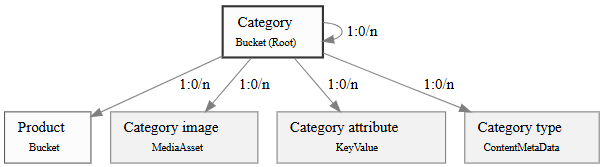
The Category bucket and the entities linked to it.
| Entity | Type | Description |
|---|---|---|
| Category | Bucket (Root) | Represents the catalog hierarchy. A category can contain products, category images, category attributes, and category type information. |
| Product | Bucket | Represents an individual product that belongs to a category. |
| Category image | MediaAsset | Stores the image associated with a category, such as a thumbnail or banner. |
| Category attribute | KeyValue | Stores additional metadata for a category as configurable key-value pairs. |
| Category type | ContentMetaData | Defines the type or classification of a category using structured metadata. |
Product
The Product bucket is the parent of all product-specific information. It holds images, prices, technical documents, metadata, and custom attributes. A product can also contain further products, for example variants or articles.

The Product bucket and the entities linked to it.
| Entity | Type | Description |
|---|---|---|
| Product | Bucket | Represents an individual product and serves as the parent entity for all product-related information. |
| Product attribute | KeyValue | Stores additional attributes of a product as configurable key-value pairs. |
| Product technical drawing | MediaAsset | Stores technical drawings associated with a product. |
| Product image | MediaAsset | Stores the primary image associated with a product. |
| Product label | MediaAsset | Stores the product label artwork or packaging label. |
| Product promotion price | Price | Stores the promotional price of a product. |
| Product list price | Price | Stores the standard list price of a product. |
| Product icon | MediaAsset | Stores the icon representing a product. |
| Product application | MediaAsset | Stores images illustrating the application or usage of a product. |
| Master Data | KeyValue | Stores master data associated with a product as configurable key-value pairs. |
| Price | KeyValue | Stores additional pricing-related information as key-value pairs. |
| Product type | ContentMetaData | Defines the classification or type of a product using structured metadata. |
Relationships
The demo data imports only category and product entities. The relationship between them is one-to-many: one category holds many products. Both entities also nest recursively, so a category can hold further categories and a product can hold further products.
Next Steps
Start using the Demo System