General Reference
Overview
This page describes the common wizard step types, configuration concepts, and document rendering process used by selection-based and import-based rendering.
Both rendering methods use W2P_GENERIC_DOCUMENT_RENDERING to render documents. Their wizard step IDs, workflow processes, and rendering behavior differ and are documented on the corresponding reference pages:
Common Wizard Step Types
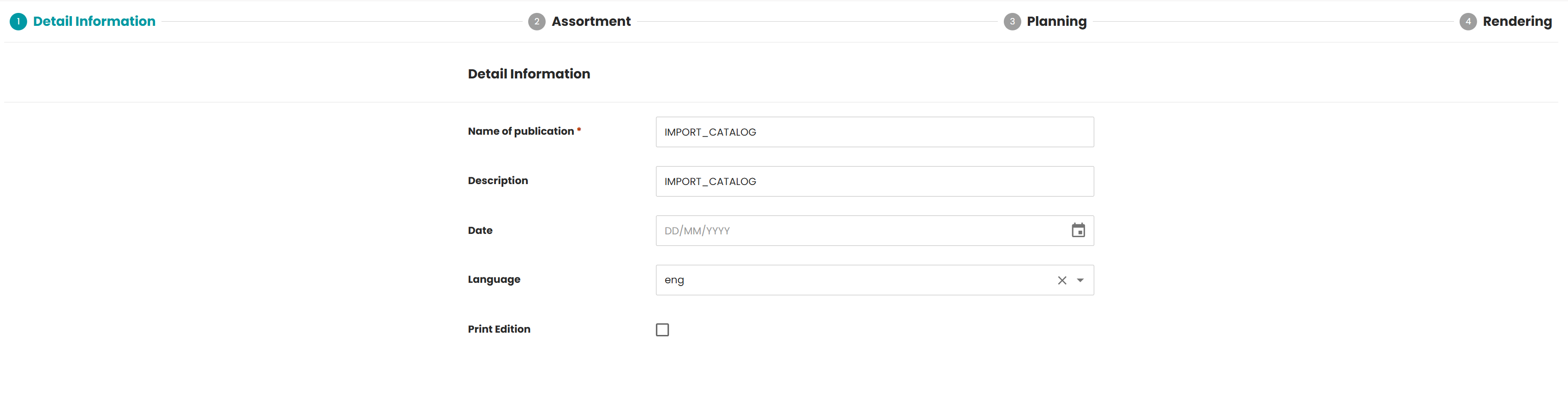
Detail Information
Based on the W2P FORM step. It displays a dynamic form where users enter or update the metadata of a publication.
The form supports text boxes with or without validation, date pickers, dropdown lists, and checkboxes.
The two rendering methods use different step IDs for this purpose:
| Rendering method | Step ID |
|---|---|
| Selection-based | generic_detail |
| Import-based | generic_import_detail |
Rendering
The Web2Publish PROCESS step runs a backend Camunda process as part of the wizard workflow. Each rendering method calls its own workflow process:
| Rendering method | Step ID | Camunda process |
|---|---|---|
| Selection-based | generic_render | W2P_GENERIC_SELECTION_RENDERING |
| Import-based | generic_import_render | W2P_GENERIC_IMPORT_RENDERING_AND_EXPORT_PDF |
For both methods, the user selects a PDF profile before starting rendering. When rendering finishes, a preview is displayed and PDF download is enabled.
These workflow processes are specific to their rendering methods. They both use the shared document rendering process described below.
Common Configuration
duplicate_post_process
In the Detail Information step, duplicate_post_process allows a Camunda process to duplicate the physical files of the publication template, if those files exist.
The demo does not require this parameter for either rendering method, so it can be left unused.
Shared Document Rendering
W2P_GENERIC_DOCUMENT_RENDERING
W2P_GENERIC_DOCUMENT_RENDERING renders the document and is used by both selection-based and import-based rendering.
It handles the shared document rendering part of the workflow. The method-specific processes remain responsible for their respective rendering workflows:
- Selection-based rendering: The wizard calls
W2P_GENERIC_SELECTION_RENDERING. - Import-based rendering: The wizard calls
W2P_GENERIC_IMPORT_RENDERING_AND_EXPORT_PDF.
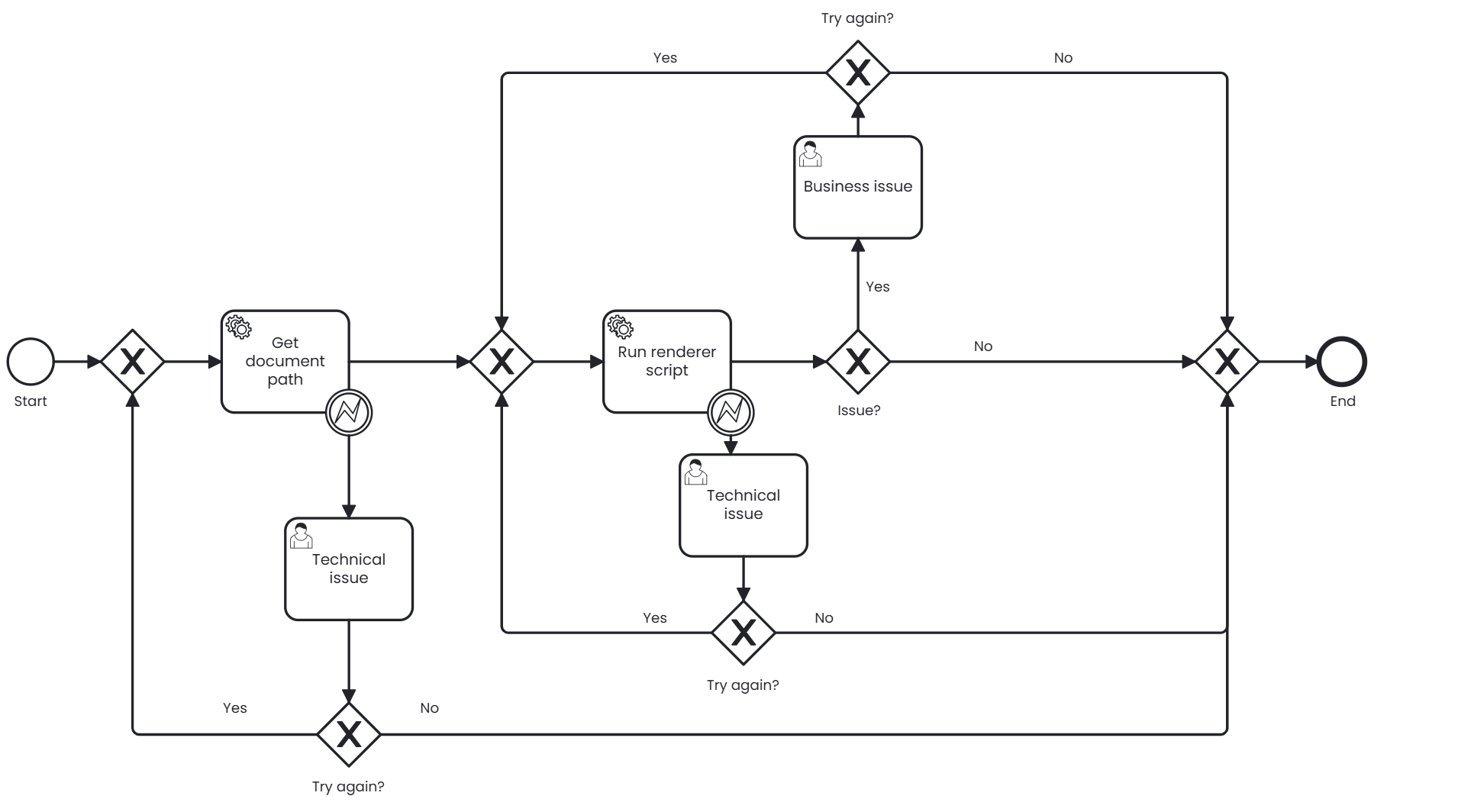
Pass scriptId with the value 537407996 to W2P_GENERIC_DOCUMENT_RENDERING. This default script renders the document directly. It does not need a page template or a template configuration.
For details about the scriptId and how it works, see Generic Product List by Rule.
For method-specific process details, see Selection-Based Rendering and Import-Based Rendering.
Publication Type Metadata
The Web2Publish skeleton provides two publication types. Assign the type that matches your rendering method when creating a publication in priint:planner.
| Rendering method | XML file | Publication type label |
|---|---|---|
| Selection-based | Generic_Selection_Based_Rendering.xml | Generic Selection Based Rendering |
| Import-based | Generic_Import_Based_Rendering.xml | Generic Import Based Rendering |
Both XML files define the same common metadata and defaults. Both types also include _language and _country in the Context group.
This reference describes the definitions exported in these two files. Metadata identifiers are the technical names used by configuration and scripts; labels are the names shown to users.
An XML definition describes a field and its default value. It does not define how a wizard or process uses that field. That depends on the Web2Publish configuration, scripts, and Camunda processes.
W2P Metadata
These fields belong to the W2P metadata group and are present in both publication types.
| Label | Identifier | Field type | Default | Purpose |
|---|---|---|---|---|
| W2P Is Template | w2p_is_template | Checkbox | Unchecked | Identifies a publication as a Web2Publish template. Enable this when preparing the publication template. |
| W2P Is Completed Publication | w2p_is_completed_pub | Checkbox | Unchecked | Completion flag that can be used by the configured workflow. |
| W2P Dynamic Document | w2p_dynamic_document | Checkbox | Unchecked | Dynamic-document flag. Its effect depends on the wizard configuration. |
| W2P Pub Status | w2p_pub_status | Dropdown | detail | Stores a publication workflow status. Available values are listed below. |
| W2P Content Selection | w2p_content_selection | Checkbox | Checked | Content-selection flag. Its effect depends on the wizard configuration. |
| W2P Print Edition | w2p_print_edition | Checkbox | Unchecked | Print-edition flag for use by the configured workflow or scripts. |
| W2P Valid From | w2p_valid_from | Date | Empty | Start date of the publication's validity period. |
| W2P Valid To | w2p_valid_to | Date | Empty | End date of the publication's validity period. |
The XML files do not define automatic filtering or validation based on the validity dates, or the actions triggered by the print-edition flag.
Publication Template Flag
To make a publication available as a template:
- Open the publication in priint:planner and select Edit.
- Go to Metadata > W2P.
- Select W2P Is Template.
- Click Save.
The default is unchecked, so assigning the publication type alone does not mark the publication as a template.
Publication Status Values
Both publication types use the w2p_pub_status dropdown with the following values:
detail: default valueproducts_assignment_statusselect_assortmentplanningrenderdownload
These are the available status values, not a guaranteed sequence of wizard steps. The configured workflow determines which values are used and when they change.
Context Metadata
Both publication types include these fields in the Context group:
| Group | Label | Identifier | Field type | Default | Purpose |
|---|---|---|---|---|---|
| Context | Language | _language | Text | Empty | Language context value for use by the import or rendering configuration. |
| Context | Country | _country | Text | Empty | Country context value for use by the import or rendering configuration. |
Template and Page Metadata
The following fields are present in both XML files.
| Group | Label | Identifier | Field type | Default | Purpose |
|---|---|---|---|---|---|
| Template | Rendering Rule Set | _renderingruleset | Text | Empty | Identifies the product list rule set used by the rendering configuration. |
| Parent Page | Page Template | _priint_pageTemplate | Text | Empty | Supplies a page template identifier when referenced by the rendering configuration. |
| Parent Page | Parent Page | Masterpage | Text | Empty | Field for a parent page value. How it is applied depends on the rendering implementation. |
| Parent Page | Set Parent Page | SetMasterpage | Checkbox | Checked | Flag for applying a parent page, as used by the rendering implementation. |
| Snippet | Snippet | _snippet | Checkbox | Checked | Snippet flag, as used by the rendering implementation. |
Rendering Rule Set
When using the Generic product list by rule configuration, _renderingruleset must match its configId. For example, a rule set with configId="Generic" expects the value Generic.
Page Template
The product list rule configuration evaluates the standard _priint_pageTemplate:
<pageTemplate>
    <documentParameter identifier="_priint_pageTemplate"/>
</pageTemplate>
The field is empty by default in both publication type exports. Its presence does not mean that users must always configure it: the default rendering script described below supports rendering without page template or template configuration.
Metadata and Rendering Configuration
Keep the following distinctions in mind when setting up Web2Publish:
-
Publication type ID: Use the ID of the imported publication type for
${publicationTypeId}in the W2P ISON configuration. The IDs in the source exports are537795489for selection-based and537796615for import-based; verify the IDs in your target system rather than assuming that they remain unchanged after import. -
Template flag: Enable
w2p_is_templateon the publication intended to serve as the template. -
Wizard mappings: Match metadata identifiers to the fields configured in the wizard.
w2p_dynamic_documentandw2p_content_selectionare two separate fields. Check the wizard configuration to see which one it uses. -
Rendering script:
scriptIdis a process parameter, not a metadata field in either XML file. For the value to pass, see Shared Document Rendering.
Installation
Both rendering methods follow the same installation procedure, with publication types and workflow processes selected according to the rendering method you want to use.
For package deployment, publication type import, Camunda process deployment, configuration, and publication template creation, see Installation.