AttributeKeyValueCommonList
Overview
The AccPack_AttributeKeyValueCommonList is the standard placeholder that collects the KeyValues that all child buckets (or planned buckets) of the current record have in common.
Use it on a parent record to show what its children have in common, without listing each child. For example, a bucket holds several articles. Show only the attributes that all articles share, such as length, width, type.
Concepts
Which KeyValues are kept
Compare decides when entries from different children count as the same KeyValue. Two entries are equal when their rendered values are equal.
MatchRule decides what happens when some children lack a KeyValue:
All children must have: The KeyValue appears only if every child has a non-empty entry for it. Use this to show only what all articles share.Ignore children without: Children without an entry (missing or empty) are ignored. The KeyValue is kept even when only one child has it. Use this to show everything that at least one child has.
How the list looks
Sort and Sort Direction set the order of the entries, based on their rendered values. Designator sets how each KeyValue is shown, for example as a key, a tab, then the value with its unit. Separator joins the entries into one text.
Choosing fields for Compare, Sort and Designator
A KeyValue carries several fields, such as its label, key, value and unit. Compare, Sort and Designator each let you pick which fields to use, either by typing tokens yourself or by picking a ready-made preset.
Wrap a field name in curly braces to use it as a token, for example {label}: {value} {unit}. Combine several tokens, or
add fixed text between them. Only characters that cannot be typed need a token, such as {tab}. A space or any other
character can be used as is.
A preset is a shortcut for a common token combination. Pick a preset instead of typing the tokens yourself.
Reference
Placeholder type: Text
Entity: Works with planning records and bucket records
Function Variables
-
MatchRule:
All children must have(Default) orIgnore children without. -
Compare: A field preset or custom input with tokens.
-
Sort: A field preset or custom input with tokens (Default:
None). -
Sort Direction:
Ascending/Descending. Ignored when Sort isNone. -
Designator: A field preset or custom input with tokens.
-
Separator: Character used to join retrieved values:
Line Break,Comma,Semicolon, orSpace. -
Result Entity Id: Identifier of the KeyValue result entity.
For how these options work, see Concepts. For the available fields, see Tokens and Presets for Compare, Sort and Designator.
Tokens
These tokens are supported in custom input for Compare, Sort and Designator:
| Group | Tokens |
|---|---|
| Fields | {label} {key} {symbol} {value} {unit} {parent_identifier} {group_identifier} {seq} |
| Special characters | {tab} |
Presets for Compare, Sort and Designator
| Preset | Equivalent input |
|---|---|
| Label | {label} |
| LabelValueWithoutUnit | {label}: {value} |
| LabelValueWithUnit | {label}: {value} {unit} |
| Value without Unit | {value} |
| ValueWithUnit | {value} {unit} |
| Key | {key} |
| Symbol | {symbol} |
| Unit | {unit} |
| Parent Identifier | {parent_identifier} |
| Group Identifier | {group_identifier} |
| Sequence | {seq} |
Developer Specifications
-
Data Query:
com.priint.accpack.placeholder.dataquery.KeyValueDataQueryPlugin.getEmptyKeyValueList -
Data Mapping:
com.priint.accpack.placeholder.datamapping.getCommonKeyValueList -
Data Processing:
-
tidyToXhtml: Converts HTML into valid XHTML (body content only) viacom.priint.pubserver.comet.bridge.dataprocessing.HtmlFunctions.tidyToXhtml. -
htmlToTaggedText: Essential for maintaining PIM-defined typography/styles by converting HTML tags into priint:comet tagged text for InDesign viacom.priint.pubserver.comet.bridge.dataprocessing.HtmlFunctions.htmlToTaggedText.
-
Global Configuration Logic
Context Definition
Generic placeholders use the _language and _country parameters by default. Configure this globally in the project
settings, so all placeholders in the publication use the same context.
For more details, see Context Definition.
Technical Environment & Deployment
For deployment of generic placeholders, see Installation and Configuration.
Demonstration & Implementation Examples
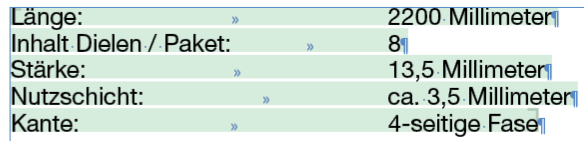
In this example, you want to list all KeyValues that the child articles share. Each line shows the key, a tab, then the
value with its unit, for example Länge:, a tab, then 2200 Millimeter. The tab lines up the values in one column.
Screenshot 1: Placeholder Options configuration
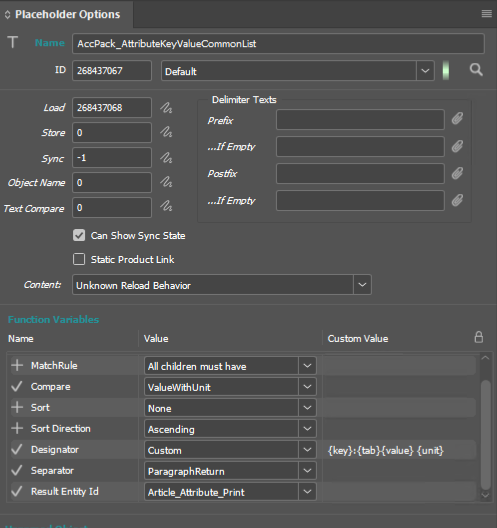
The placeholder uses these settings:
- MatchRule:
All children must have. In this case: only KeyValues that every article has are shown. - Compare:
ValueWithUnit. In this case: two entries count as the same when value and unit match. - Sort:
None. In this case: the entries keep their original order. - Sort Direction:
Ascending. In this case: it has no effect, because Sort isNone. - Designator:
Customwith the custom value{key}:{tab}{value} {unit}. In this case: each line shows the key, a colon, a tab, the value, a space and the unit. - Separator:
ParagraphReturn. In this case: each KeyValue starts a new paragraph. - Result Entity Id:
Article_Attribute_Print. The entity where the KeyValue data should be taken from.
Screenshot 2: Result shows one KeyValue per line, with the key, a tab and the value with its unit