AttributeKeyValueFromParent
Overview
1. AccPack_AttributeKeyValueFromParent
AccPack_AttributeKeyValueFromParent is a generic key value placeholder that retrieves a key value of the parent of the bucket or planned bucket. The placeholder can be linked with a bucket or planning record and the parent is determined automatically.
2. Architectural Decision: Choosing the Correct Placeholder
The strategic selection of a placeholder depends on the target data’s location within the entity hierarchy relative to the linked content. While AccPack_AttributeKeyValue is the standard for localized data, AccPack_AttributeKeyValueFromParent is engineered specifically for hierarchical data inheritance.
Comparison between AccPack_AttributeKeyValue and AttributeKeyValueFromParent
| Placeholder Name | Primary Data Source Location | Linkage Logic |
|---|---|---|
| AccPack_AttributeKeyValue | Current Level (Current Bucket / Planned Bucket) | Direct link; retrieves data assigned to the current record. |
| AccPack_AttributeKeyValueFromParent | Parent / Higher Level (e.g., pulling Product data for an Article) | Automatic parent determination; offloads upward traversal work to the plugin. |
By utilizing the FromParent variant, architects reduce manual linking errors. The logic offloads the traversal mechanic to the plugin, which automatically determines the correct parent entity in the hierarchy, ensuring that data inheritance (such as a Product's technical description appearing on all child Articles) is handled programmatically.
Technical Specifications
Placeholder type: Text
Entity: Works with planning records and bucket records
Function Variables
The behavior of the placeholder is controlled through the following variables:
-
Key: Defines the specific key of the record to be retrieved.
-
Designator: Specifies which field of the KeyValue record found at the parent level to display: Value without unit, Value with unit, Label, Symbol, Unit, or Parent Identifier.
-
Selection: Configures the filtering logic based on planning record selection (see Selection Variable Logic below).
-
Result Entity ID: Result from query or previous functions in the processing chain.
-
ParentEntity: Defines the specific entity type where the upward traversal stops and data is retrieved.
-
ContentMetaDataEntityId: (Generic Model) Metadata identifier for target layer identification.
-
ContentMetaDataEntityKey: (Generic Model) Metadata key for target layer identification.
-
ContentMetaDataValue: (Generic Model) Metadata value for target layer identification.
Developer Specifications
-
Data Query:
com.priint.accpack.placeholder.dataquery.getListKeyValueOfParent -
Data Mapping:
com.priint.pubserver.plugins.datamapping.DataMappingToString.firstKeyValueByKeyToString -
Data Processing:
-
com.priint.pubserver.plugins.dataprocessing.htmlToPlainText: Fully qualifies the string by removing all HTML tags. -
com.priint.pubserver.comet.bridge.dataprocessing.htmlToTaggedText: Converts HTML for native priint:comet processing in InDesign.
-
Global Configuration Logic
Configuration of this placeholder relies on context definition and selection variables to filter data based on project settings and planning statuses.
1. Context Definition
Generic placeholders default to using the _language and _country parameters. For high-standard implementations, this behavior should be configured globally within the project settings to ensure consistency across the publication.
For more details please kindly check Context Definition
2. Selection Variable Logic
When a planning record is assigned to the placeholder, the following selection modes apply:
-
Ignore selected content: Recognizes all key-value records in the parameter bucket.
-
Only selected content: Only returns values if they are explicitly selected in the planning record.
-
Use all if no content selected: Acts as the fallback state, returning all available records from the bucket.
Technical Environment & Deployment
Consultants could find guide for deployment of generic placeholders here: installation & configuration
Demonstration & Implementation Examples
-
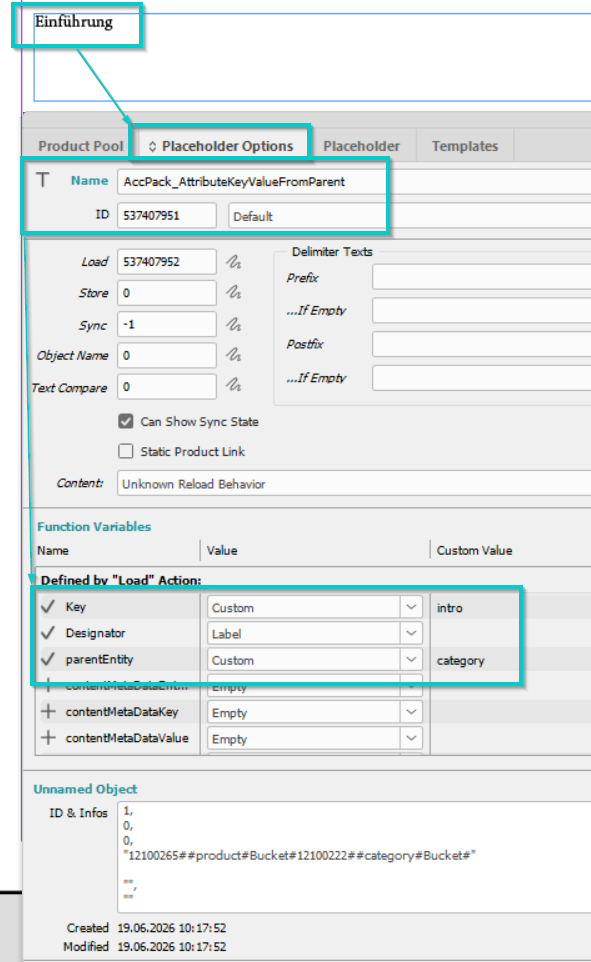
Placeholder Configuration The following image demonstrates the configuration of function variables within the Placeholder Options dialog, specifically the setup for upward traversal.
-
Product data example (in priint:suite):
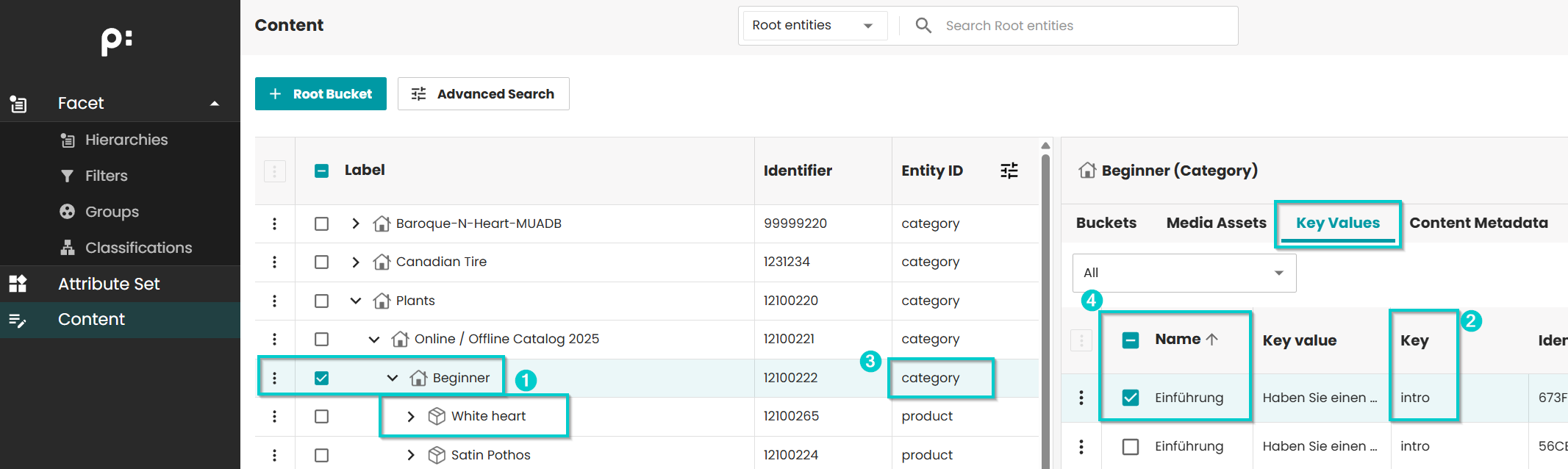
- Built product: White heart, Parent: Beginner
- Key to be displayed: intro
- Entity Id of parent of displayed product: category
- Expected displayed value: Einführung
- Notes:
- ContentMetaData variables are not required
- Selection variable is typically left empty as the system identifies the parent through the predefined tree structure.
- The Generic Entity Model Used for recursive or flexible hierarchies (e.g., Item -> Item -> Item). In these models, ContentMetaData is the only method to differentiate between identical entity types. It must be ensured that metadata variables are unique; configuration will fail if the target layer cannot be explicitly identified via metadata.
Result:
Further Reading
-
AttributeKeyValue — retrieves a key value from the current bucket
-
AttributeKeyValueList — retrieves multiple key values as a list