MediaAsset
Overview
1. AccPack_MediaAsset
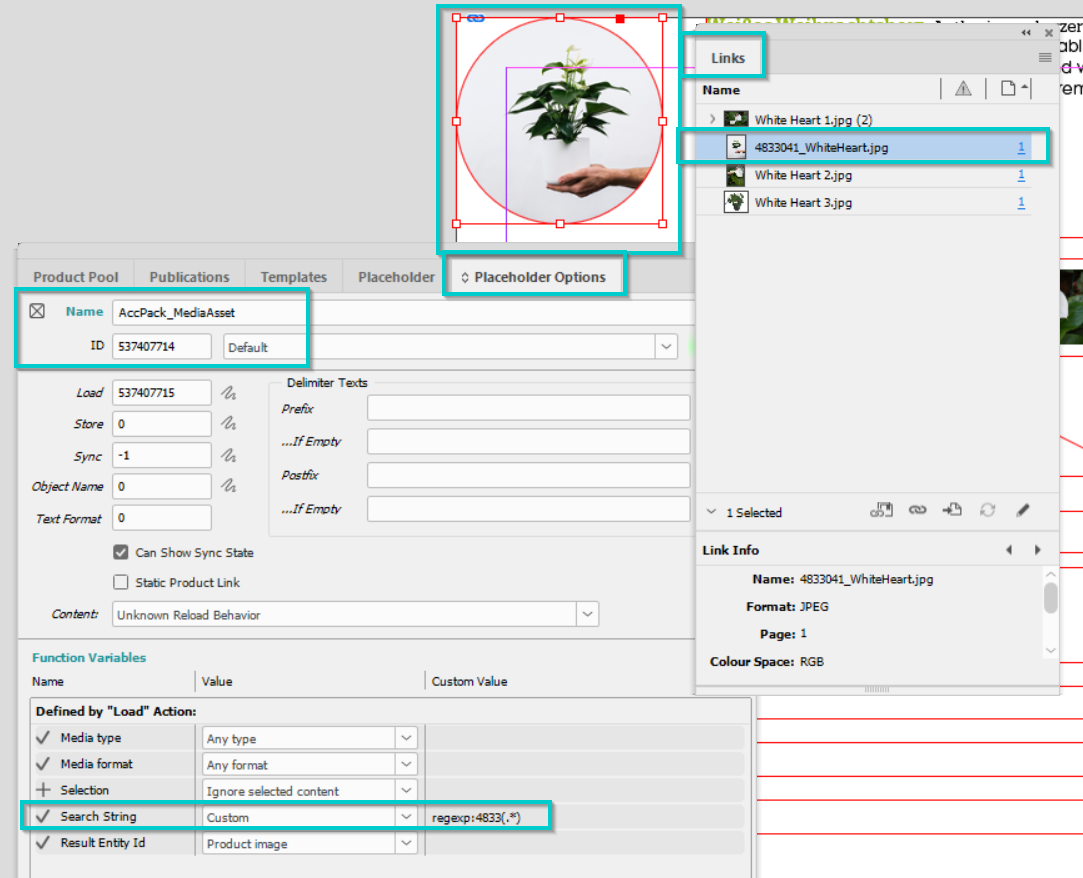
The AccPack_MediaAsset gets a media asset of a bucket or planned bucket and places it in an image frame. Returns the first matching asset. Use this for single-image placeholders — product shots, logos, or any other image linked to the current bucket.
2. Architectural Decision: Choosing the Correct Media Placeholder
Selecting the appropriate media asset placeholder depends on whether the layout requires a single specific image or an aggregated collection of assets.
| Placeholder | Primary Function | Ideal Use Case |
|---|---|---|
| AccPack_MediaAsset | Gets a single media asset from a bucket or planned bucket and places it in an image frame. | Single-image placeholders like main product shots or brand logos. |
| AccPack_MediaAssets | Gets multiple images from a bucket or planned bucket and converts them to elements in a Multi-Frame. | Image galleries, technical drawing series, or multi-view product shots. |
| AccPack_MediaAssetLabel | Searches for assets primarily by matching a regular expression against the media asset label. | Scenarios where label-based search is the primary selection mechanism rather than an entity ID. |
When to choose AccPack_MediaAsset: A consultant should choose this placeholder specifically for single-image placeholders (e.g., a product shot). It is designed to return the first matching asset based on specified filters. While AccPack_MediaAssetLabel also supports label searching, AccPack_MediaAsset is preferred for entity-based linkage—standard product images linked via established PIM relations.
Technical Specification
Placeholder type: Image Frame
Entity: Works with both planning records and bucket records
Function Variables
-
Media type: Filters assets by type (e.g.,
{*}for any,print,internet). -
Media format: Filters assets by format (e.g.,
{*}for any,tiff,jpeg). -
Selection: Defines filtering logic based on planning record selection (see Selection Variable Logic below).
-
Search String: Searches for image labels. Multiple entries can be delimited by
;. Supports theregexp:prefix for regular expression matching (e.g.,regexp:IMG(.*)). -
Result Entity ID: Defines the media asset entity identifier.
Developer Specifications
-
Data Query:
com.priint.accpack.placeholder.dataquery.MediaAssetQueryPlugin.getListMediaAsset. -
Data Mapping:
com.priint.accpack.placeholder.datamapping.MediaAssetDataMapping.firstMediaAssetToFileUrlOrFilePath(supports retrieving the file URL or file path). -
Data Processing: None.
Global Configuration Logic
1. Context Definition
Generic placeholders default to using the _language and _country parameters.
-
Static Value Reset: If the child bucket data is language-neutral, the context can be reset using the default staticValue Context Rule.
-
Mixed Usage: Use the
useDocumentVariableWithEntityCheckrule to automatically skip context if an entity is not dynamic.
2. Selection Variable Logic
The Selection variable determines behavior when a planning record is assigned in the Planner UI:
-
Ignore selected content: Every child bucket is recognized, bypassing any specific selections made in the planning record.
-
Only selected content: Only child buckets explicitly selected in the planning record will be built.
-
Use all if no content selected: Acts as the fallback state, building all child buckets unless a specific selection exists.
Technical Environment & Deployment
Consultants could find guide for deployment of generic placeholders here: installation & configuration
Demonstration & Implementation Examples
- Please check the example document which provides demo for AccPack_MediaAsset: Example
Further Reading
-
MediaAssets — gets multiple media assets as a multiframe
-
MediaAssetLabel — searches by label only with a Multiframe output
-
MediaAssetById — gets a media asset by its identifier